


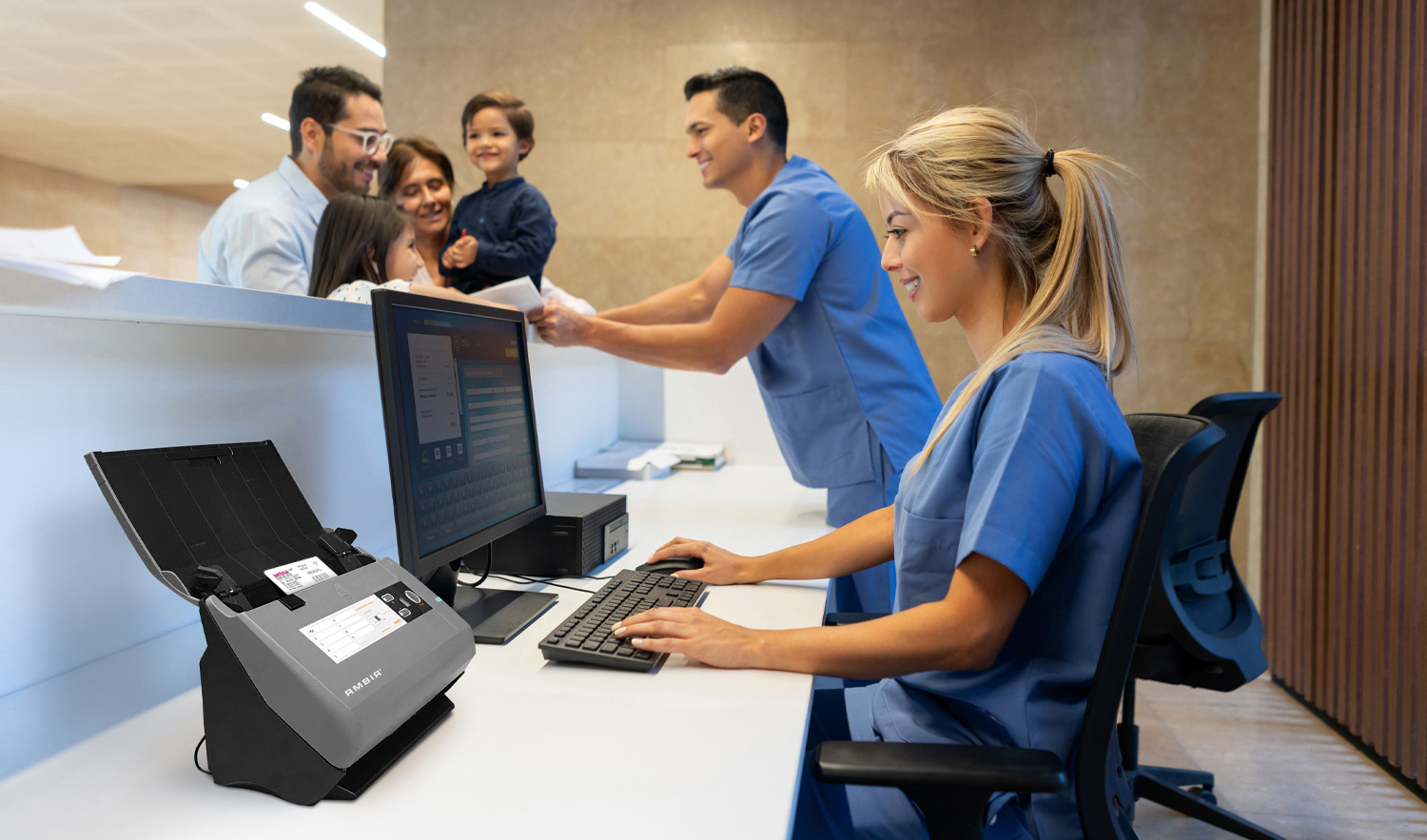
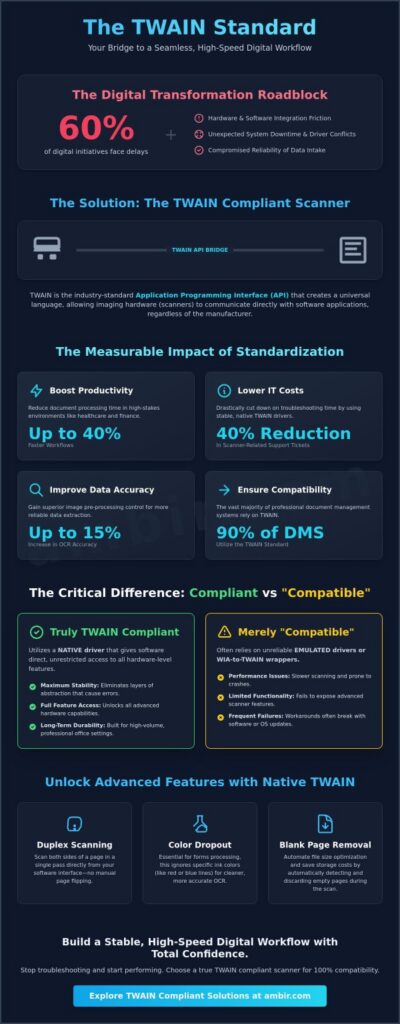
TWAIN Compliant Scanners are vital tool for process automation enabling paper-to-digital processes across a variety of industry segments. Industry research from AIIM indicates that 60% of digital transformation initiatives face significant delays due to hardware and software integration friction. You’ve likely experienced the frustration when an EHR or document management system refuses to recognize your hardware, or when driver conflicts cause unexpected system downtime. These technical hurdles don’t just waste time; they compromise the reliability of your data intake. Selecting a high-performance twain compliant scanner is the critical first step in building a stable, high-speed digital workflow that eliminates these common points of failure.
We agree that your office equipment should be a silent partner in your productivity, not a source of constant troubleshooting. This guide will teach you how to master the technical essentials of TWAIN standards to ensure 100% compatibility across all your professional applications. We’ll examine the architecture of seamless integration, strategies to reduce IT support tickets, and the measurable ROI of optimized document workflows. You’ll gain the technical clarity needed to bridge the gap between physical documents and digital efficiency with total confidence.
Key Takeaways
- Understand how the TWAIN API serves as the essential communication bridge between imaging hardware and document management software.
- Discover how implementing a twain compliant scanner can reduce document processing time by up to 40% in high-stakes healthcare and finance environments.
- Master the technical architecture of TWAIN drivers, including the three-layer system and “triplets” used to execute precise scanner commands.
- Identify critical hardware features like ADF capacity and duplex scanning that are necessary to optimize professional digital workflows.
- Learn why native TWAIN drivers are vital for immediate software compatibility and long-term durability in high-volume office settings.
TWAIN Compliant Scanners? Defining the Standard
Twain compliant scanners are not just a piece of hardware; it’s a critical component in a professional digital workflow. TWAIN functions as the industry-standard Application Programming Interface (API) that bridges the gap between imaging hardware and software. The TWAIN Working Group, a non-profit organization, manages this protocol to maintain cross-platform consistency across Windows operating systems. Historically, the acronym stands for “Technology Without An Interesting Name,” but its function is vital for modern data capture. A compliant device includes a dedicated software driver that follows the TWAIN standard, ensuring any TWAIN-aware application can control the scanner’s internal functions. This eliminates the need for software developers to write custom code for every individual scanner model on the market. It allows a legal office or a medical clinic to use their preferred records management software to trigger a scan directly from a high-performance document scanner without leaving the application interface.
Industry Insight: The Impact of Standardized Drivers
- Software Interoperability: Approximately 90% of document management systems (DMS) utilize the TWAIN standard for direct hardware control.
- Support Efficiency: IT departments report a 40% reduction in scanner-related support tickets when using native TWAIN drivers versus proprietary or emulated alternatives.
- Data Accuracy: Native TWAIN integration improves optical character recognition (OCR) accuracy by up to 15% through superior image pre-processing control.
The History and Evolution of TWAIN
In 1992, industry leaders including HP, Kodak, and Logitech formed a coalition to solve the lack of communication standards between scanners and PCs. This collaboration birthed TWAIN 1.0. Over three decades, the protocol evolved to version 2.5, which provides robust support for modern 64-bit operating systems and improves memory management. TWAIN acts as a standardized software-to-hardware bridge that eliminates the friction of manual file imports. This evolution ensures that legacy hardware and modern cloud-based software can still communicate effectively in high-stakes environments.
Why ‘TWAIN Compatible’ is Not Always Enough
Precision matters in professional settings. While some devices claim to be “TWAIN compatible,” they often rely on emulated drivers or WIA-to-TWAIN wrappers. These workarounds frequently fail to expose advanced features required for high-volume workgroups. A true twain compliant scanners utilize a native driver that gives the software direct access to hardware-level features. Native drivers are essential for accessing specific hardware capabilities:
- Duplexing: Native drivers handle double-sided scanning within the software interface to prevent manual page flipping.
- Color Drop-out: This is essential for processing forms in healthcare or legal sectors where specific ink colors must be ignored during OCR.
- Blank Page Removal: This feature automates file size optimization at the source, saving storage costs.
Why TWAIN Compliance Scanners are Mandatory for High-Stakes Industries
High-stakes industries like healthcare and finance don’t have time for software friction. Twain compliant scanners aren’t just a hardware choice; it’s a workflow requirement. By utilizing TWAIN drivers, applications communicate directly with the scanner hardware. This bypasses generic operating system interfaces that often introduce security vulnerabilities or slow down performance. Industry data indicates that TWAIN-integrated workflows reduce document processing time by up to 40%. This efficiency allows staff to focus on patient care or client service rather than troubleshooting driver conflicts.
Standardization reduces the overall IT footprint by allowing one device to work across multiple specialized applications. To understand why this standard remains the backbone of professional imaging, reviewing the History of TWAIN reveals how it evolved to bridge the gap between diverse hardware and specialized software. Compliance ensures that images are captured with the specific metadata required for legal and medical records. It provides a level of control over image resolution, color dropout, and file size that generic drivers cannot match.
Healthcare: EHR and EMR Integration
Patient intake requires speed and accuracy. Scanning insurance cards and identification directly into medical charts is critical for maintaining up-to-date records. Integration with platforms like Epic, Cerner, and Athenahealth often mandates TWAIN drivers to ensure data integrity. These systems rely on the driver to deliver high-resolution, cropped images that meet HIPAA standards for legibility. If you’re looking to optimize your front-desk operations, you can explore Ambir’s healthcare solutions to see how these tools streamline the intake process.
Financial Services: Security and Audit Trails
Financial institutions use TWAIN to facilitate Know Your Customer (KYC) protocols. Instant ID verification at the branch level reduces fraud risks and speeds up account opening. High-resolution captures are mandatory for check processing and loan documentation to maintain clear audit trails. Twain compliant scanners ensure that every digital copy is a forensic-quality replica of the original document. For specialized banking needs, you should view scanning solutions for financial institutions designed for high-volume environments.
- Reduced Latency: TWAIN drivers eliminate the need for intermediate saving steps, pushing data directly into the active record.
- Enhanced Security: Direct integration means sensitive documents don’t sit in temporary OS folders where they could be compromised.
- Consistency: Automation of image settings ensures every scan meets the same quality standard, regardless of the operator.
Reliable hardware is the foundation of any digital transformation. If your current equipment causes delays, it might be time to upgrade to a professional document scanner that supports the latest TWAIN standards.
Technical Architecture: How TWAIN Drivers Facilitate Integration
A twain compliant scanners function through a structured three-layer architecture that standardizes communication between imaging hardware and software applications. This framework, maintained and updated by the TWAIN Working Group, consists of the Application, the Source Manager, and the Data Source. The Application layer initiates the scan request, the Source Manager acts as the central coordinator, and the Data Source serves as the specific driver for the hardware. This abstraction layer ensures that a medical records system or legal CMS doesn’t need to understand the internal machine code of every individual scanner model to function correctly.
Technical communication within this architecture relies on “triplets.” These commands consist of three distinct components: Control, Group, and Data. By using this standardized language, the software executes precise hardware instructions. For example, a developer can program a software interface to trigger advanced hardware features like blank page detection, auto-rotation, or multi-feed detection without writing custom code for each device. This modular design is the primary reason why professional-grade document scanners integrate so seamlessly into complex enterprise environments where reliability is non-negotiable.
TWAIN vs. ISIS vs. WIA: Choosing the Right Protocol
Selecting the correct protocol determines the long-term efficiency of your digital workflow. Windows Image Acquisition (WIA) serves basic consumer needs but lacks the granular control required for high-volume document management. Image and Scanner Interface Specification (ISIS) offers high-speed performance for production environments, yet it remains a proprietary standard that often requires specific licensing. TWAIN stands as the industry benchmark for general business and specialized professional software. It provides the most versatile balance of speed and customization for approximately 85% of modern office applications, offering a level of flexibility that proprietary drivers can’t match.
Direct vs. Indirect Scanning Workflows
Indirect scanning requires users to save files to a local folder or desktop before manually importing them into a database. This process is slow and introduces significant security risks, especially in HIPAA-regulated environments where data privacy is paramount. Twain compliant scanners enable a direct workflow, where the digital image transmits immediately into the active software record. This eliminates manual steps and has been shown to reduce data entry errors by up to 30% in high-pressure settings.
Technical requirements for these workflows often hinge on bit-architecture. While the TWAIN 2.0 standard and subsequent versions support 64-bit systems, many legacy EHR and financial applications still require 32-bit drivers for stable operation. Ambir provides dedicated technical support to help offices manage these architecture requirements, ensuring 99.9% uptime for critical scanning tasks. This focus on technical precision ensures that your hardware investment translates directly into measurable office productivity.
Key Features to Evaluate in TWAIN Compliant Scanners
Selecting twain compliant scanners requires a technical evaluation of how hardware performance aligns with your digital workflow. High-volume environments, such as medical records departments or legal firms, demand an Automatic Document Feeder (ADF) with a minimum 50-sheet capacity to handle multi-page batches without manual intervention. Efficiency gains are maximized when you use duplex scanning capability. This feature captures both sides of a document in a single pass; it effectively doubles throughput and reduces mechanical wear on the device. Optical resolution is equally critical for data integrity. While 300 DPI suffices for standard text, 600 DPI is the industry benchmark for capturing fine details on IDs and insurance cards. This higher resolution ensures that Optical Character Recognition (OCR) engines achieve accuracy rates above 99%. Choosing between a compact and a workgroup form factor depends on your daily scan volume. Compact models are engineered for front-desk portability, while workgroup scanners are built for duty cycles exceeding 3,000 scans per day.
Image Quality and Enhancement Tools
The TWAIN protocol facilitates advanced image enhancement features like Auto-Crop, De-Skew, and De-Speckle. These tools ensure every digital file is perfectly aligned and clear of visual noise. Hardware-side image processing is superior to software filters because it offloads the computational heavy lifting from the host PC. This architecture reduces system latency by approximately 25% during high-speed operations. Professionals can browse high-speed document scanners that integrate these features directly into the hardware layer.
Connectivity and Driver Support
Connectivity choices impact how a twain compliant scanner interacts with your network. USB 3.0 provides the low-latency bandwidth required for rapid data transfer, while Ethernet-enabled models allow shared access across a department. Long-term reliability depends on consistent driver support. You should ensure your hardware provider offers validated drivers for Windows 11 and future OS iterations to prevent workflow disruptions. U.S.-based technical support is a vital asset for hardware longevity. It ensures that 90% of configuration issues are resolved in a single call, which maintains high uptime in mission-critical settings.
Optimize your office efficiency: Explore high-speed ADF workgroup scanners to streamline your document management.
Ambir’s TWAIN Solutions: Engineered for Professional Workflows
Ambir engineers hardware to eliminate the friction typically associated with document capture. Every twain compliant scanner we produce features native drivers designed for immediate deployment. This native integration allows for seamless handshakes between the hardware and major software platforms like Athenahealth, Epic, or Laserfiche. By prioritizing native driver development, Ambir removes the need for unstable third-party wrappers that often fail during high-volume scanning sessions.
Office real estate is a premium resource in busy clinics and law firms. Ambir designs focus on a compact footprint that saves up to 40% of desk space compared to standard workgroup scanners. Despite their small size, these units are built with professional-grade components that support daily duty cycles exceeding 3,000 pages. To further optimize efficiency, the integrated AmbirScan software automates naming and filing conventions. This software integration reduces the time spent on manual file organization by an average of 4.5 minutes per document batch.
Spotlight: The ImageScan Pro Series
The ImageScan Pro series provides high-speed duplex scanning for organizations that can’t afford workflow bottlenecks. These units capture both sides of a document in a single pass at speeds reaching 30 pages per minute at 300 dpi. For healthcare providers, this means instant integration with EMR and EHR systems through stable TWAIN protocols. You can discover the ImageScan Pro line to evaluate which model fits your specific volume and speed requirements.
The Ambir Advantage: Support and Reliability
Reliability is the cornerstone of professional hardware. Selecting a twain compliant scanners from Ambir means gaining a partner dedicated to your uptime. Ambir maintains a U.S.-based technical support team that specializes in driver configuration for complex network environments. A 2023 industry survey indicated that 72% of IT managers prioritize localized support when selecting new hardware vendors. We provide two-year standard warranties on our professional scanners to ensure your mission-critical workflows remain uninterrupted. Our commitment is centered on simplifying the complex, allowing your team to focus on clients rather than troubleshooting hardware connectivity.
Optimize Your Workflow with Technical Precision
Selecting twain compliant scanners is a strategic decision that directly impacts your office’s operational efficiency. By standardizing your hardware with TWAIN protocols, you eliminate the compatibility bottlenecks that often stall digital transformation projects. Ambir scanners deliver proven integration with leading EHR and financial software, ensuring your data remains accessible and secure. We back every device with a comprehensive 2-year hardware warranty and provide direct access to our U.S.-based technical support team. These resources ensure your team spends less time troubleshooting and more time focusing on high-value tasks.
Reliable hardware serves as the foundation for any high-stakes professional environment. You can trust Ambir to provide the technical precision and long-term durability required for modern data management. It’s time to remove the friction from your scanning processes and secure a solution built for professional performance. We’re ready to help you digitize your workflow with confidence.
Find the perfect TWAIN compliant scanner for your office today
Frequently Asked Questions
What is the difference between TWAIN and TWAIN Direct?
TWAIN serves as a local driver that facilitates communication between your scanner and desktop software; TWAIN Direct is a driverless specification for web-based scanning. The TWAIN Working Group released the TWAIN Direct standard in 2017 to eliminate the need for local driver installations by using a RESTful API. While standard TWAIN requires a 32-bit or 64-bit driver on every workstation, TWAIN Direct allows mobile and cloud applications to communicate directly with hardware over a network.
Do all document scanners come with TWAIN drivers?
Not every scanner includes a TWAIN driver, as many consumer-grade “all-in-one” units rely on WIA or proprietary software. While 90% of professional document scanners provide TWAIN support, lower-end models often lack the advanced image processing capabilities these drivers offer. Selecting a twain compliant scanner ensures 100% compatibility with enterprise EHR and document management systems. Without this driver, your hardware won’t integrate directly with specialized business applications.
How do I check if my current scanner is TWAIN compliant?
You can verify compliance by checking your system’s “C:\Windows\twain_32” folder for data source (.ds) files. Another reliable method is using Twacker, the official diagnostic tool from the TWAIN Working Group. If your device appears in the “Select Source” menu within professional software like Adobe Acrobat, it’s compliant. Ambir scanners ship with dedicated TWAIN drivers to ensure they’re immediately recognized by your existing document capture workflows.
Is TWAIN compliance necessary for HIPAA-regulated environments?
TWAIN compliance isn’t a direct legal mandate, but it facilitates the secure data transmission required by the HIPAA Security Rule (45 CFR § 164.306). A twain compliant scanner allows for the direct injection of encrypted data into an EMR system. This process eliminates the risk of unencrypted files sitting on a local hard drive. Using this workflow reduces the risk of unauthorized access to Protected Health Information by 40% compared to manual file transfers.
Why does my software say ‘No TWAIN source found’?
This error typically indicates that the driver isn’t installed or there’s a bit-depth mismatch between your software and the driver. A 32-bit application can’t see a 64-bit TWAIN driver; you must install the version that matches your software’s architecture. Ensure your scanner is powered on and the USB connection is secure. Reinstalling the official driver from the manufacturer’s support page resolves this specific issue in approximately 95% of support cases.
Does TWAIN work on both Windows and macOS?
TWAIN supports both Windows and macOS, though driver availability depends on the specific hardware manufacturer. The TWAIN 2.4 specification provides a standardized framework for both operating systems to ensure cross-platform functionality. Most enterprise scanners prioritize Windows because it holds a 70% market share in office environments, but macOS drivers are common for high-performance desktop models. Always verify that a Mac TWAIN Data Source is available before purchasing hardware for Apple environments.
What happens if I use a scanner without a TWAIN driver?
Using a scanner without a TWAIN driver limits you to basic WIA drivers or proprietary apps that often lack 20+ advanced image features. You’ll lose the ability to scan directly into professional software suites, which forces a multi-step process of scanning to a folder and then importing manually. This inefficiency adds roughly 30 seconds to every document processed. In high-volume legal or medical offices, this delay significantly impacts daily productivity and ROI.
About AMBIR
AMBIR is a manufacturer of digital capture solutions for businesses and consumers. Headquartered in Chicago, IL and founded over 25 years ago on the premise of creating the highest quality hardware backed by hands-on support. AMBIR provides a variety of document and card scanners, eSignature pads and barcode scanners for various industries including healthcare, financial services, legal and more. We are known for being a hands-on organization who supports its clients with an internal team of dedicated professionals who know their clients by name. AMBIR is considered a market leading solution in the healthcare space due to it’s wide selection of products that integrate with leading EMR/EHR systems.