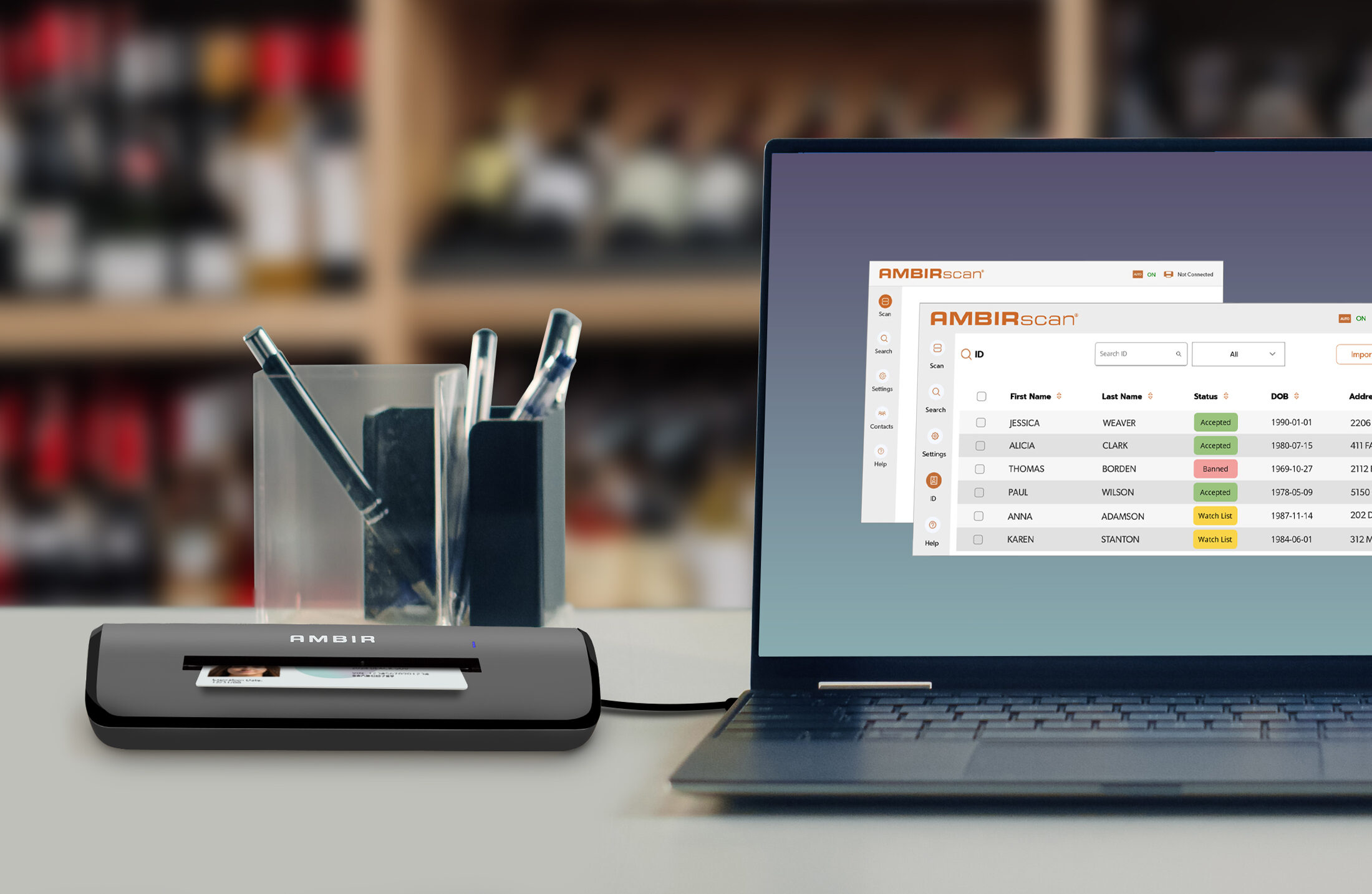



What if the primary bottleneck in your field operations isn’t the repair time, but the three-day lag it takes for paperwork to reach the back office? You’ve likely seen how administrative friction stalls invoicing and compromises audit trails. Finding the right portable scanner for field service requires more than just looking at page-per-minute speeds; it demands a deep dive into hardware durability and system synergy. We understand that hardware failure in non-office environments isn’t just an inconvenience. It’s a direct threat to your operational throughput.
This 2026 technical guide provides the specifications you need to master workflow integrations and eliminate delayed paperwork. You’ll learn how to select devices that offer real-time document synchronization and seamless compatibility with mobile FSM software. We’ll examine the technical requirements for USB-powered models like the TravelScan Pro PS600, focusing on TWAIN compliance and power draw efficiency. From reducing physical storage to improving compliance through digital-analog bridging, this overview ensures your field hardware works as hard as your technicians do. We’ll break down the industry data and performance standards that bridge the gap between analog inputs and digital outputs.
Key Takeaways
- Eliminate administrative lag by implementing real-time digital synchronization, accelerating billing cycles and improving cash flow.
- Identify critical technical specifications, such as the balance between optical resolution and file size, to ensure high-quality captures without overloading mobile networks.
- Evaluate hardware based on its physical footprint and engineering, prioritizing impact-resistant designs that withstand non-office environments.
- Learn to integrate a portable scanner for field service with existing FSM systems to automate file naming and streamline data flow to centralized servers.
- Leverage TWAIN-compliant hardware and US-based technical support to ensure seamless software synergy and long-term reliability in the field.
The Role of Digital Capture in Modern Field Service Workflows
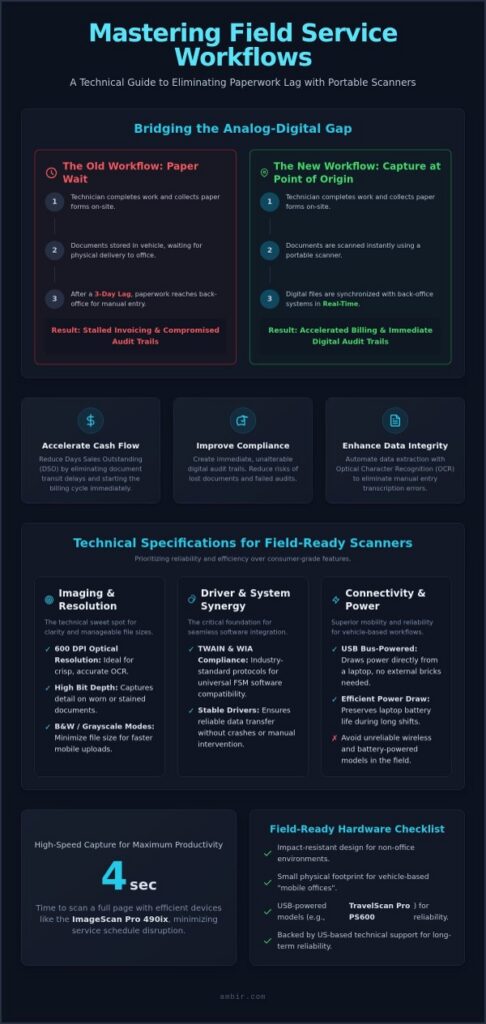
Field operations historically struggled with the “paper-wait” period. Technicians would collect work orders, receipts, and compliance forms on paper, storing them in vehicles until they could be manually filed at a central office. This delay creates administrative friction that ripples through the entire organization. Adopting a portable scanner for field service changes this dynamic by enabling real-time digital synchronization. When documents are captured on-site, they enter the workflow immediately. This transition eliminates the physical transit time of paperwork and ensures that the back office has the data they need to support the technician without delay.
Revenue cycles depend on the speed of documentation. If a signed work order takes three days to reach the billing department, the invoicing process stays stalled. Mobile scanning accelerates this cycle. By converting physical signatures into digital assets instantly, organizations see a direct improvement in cash flow. Prompt data entry also reduces the likelihood of lost or damaged documents. These are common causes of payment disputes and audit failures. Capturing information at the source isn’t just a convenience; it’s a financial necessity for agile businesses.
Quantifying Efficiency: Industry Data on Mobile Capture
Industry reports indicate that moving to mobile capture can reduce Days Sales Outstanding (DSO) by several days. An Image scanner equipped with Optical Character Recognition (OCR) technology further enhances this by automating data extraction. While manual data entry often introduces transcription errors, OCR-enabled scanning maintains data integrity across the organization. For field technicians, this shift translates to significant productivity gains. Using a high-speed device that scans a page in as fast as 4 seconds allows teams to process paperwork without disrupting their service schedule. High-speed units like the ImageScan Pro 700gt facilitate this productivity by capturing documents in seconds without requiring a return to the branch office.
Bridging the Analog-Digital Gap in the Field
Modern field service relies on “Capture at Point of Origin” strategies. This approach treats the service vehicle as a mobile office. Portable scanners act as the critical link, allowing remote teams to maintain a paperless environment while on-site. By integrating hardware like the TravelScan Pro PS600 into their daily routine, technicians can archive compliance documents and customer receipts immediately. This synchronization ensures that centralized servers stay updated in real time. It provides managers with accurate oversight of field activities and significantly reduces long-term compliance risks by creating immediate, unalterable digital audit trails.
Technical Specifications: What Defines a Field-Ready Scanner?
Selecting a portable scanner for field service involves more than checking a speed rating. In professional environments, hardware must maintain a balance between high-fidelity capture and operational efficiency. While consumer devices often prioritize maximum resolution, field-ready units focus on driver stability and power management. These technical foundations ensure that the hardware remains a reliable extension of your mobile office rather than a source of IT troubleshooting.
Driver architecture represents the most critical, yet often overlooked, specification. Professional scanners utilize TWAIN and WIA compliance to ensure system synergy. These industry-standard protocols allow the scanner to communicate directly with diverse Field Service Management (FSM) software. Without robust driver support, technicians face compatibility hurdles that cause software crashes or data loss. Reliable drivers ensure that when a technician initiates a scan, the data transfers seamlessly to the intended application without manual intervention.
Imaging Standards and Resolution Requirements
A 600 DPI optical resolution is the technical sweet spot for field operations. This level of precision provides the clarity required for accurate Optical Character Recognition (OCR) while keeping file sizes manageable for mobile uploads. High bit depth also plays a role in document accuracy. It allows the sensor to distinguish between subtle gradients, which is essential when scanning stained or weathered work orders. Technicians should utilize grayscale or black and white modes for standard documents to minimize file weight. Reserving color scanning for photographic evidence or specific identification needs preserves bandwidth and storage space on centralized servers.
Connectivity and Power Management
Power requirements dictate the mobility of the device. USB 2.0 and 3.0 bus-powered designs are superior for vehicle-based workflows. These units draw power directly from a laptop, eliminating the need for external charging bricks or internal batteries that eventually fail. Managing hardware power draw is essential to preserve the primary device’s battery life during long shifts. While wireless scanning offers some flexibility, it introduces potential failure points in remote areas with high electromagnetic interference or poor Wi-Fi stability. A direct USB connection provides a consistent, high-speed data path that remains unaffected by local environmental factors.
Evaluating scanning speeds requires looking at the total time to completion, not just the raw pages per minute (PPM). For single-page captures, a device that initializes and scans in under 5 seconds is ideal. If your team handles multi-page contracts, a 15 PPM rating ensures they don’t spend excessive time tethered to the vehicle’s console. You can explore a range of high-performance, bus-powered options within the Ambir mobile scanner lineup to find the right balance for your specific workflow.
Durability vs. Portability: Balancing Hardware Form Factors
Field service isn’t a static environment, so your hardware shouldn’t be either. A professional portable scanner for field service must withstand more than just the occasional bump. It needs to survive the constant vibrations of vehicle transit and the physical hazards of diverse job sites. While consumer-grade electronics prioritize aesthetic thinness, industrial-strength mobile scanners utilize impact-resistant plastics to protect sensitive internal optics. This engineering ensures that the feed rollers and image sensors stay calibrated even after months of heavy use in high-stakes professional environments.
Maintenance is the second pillar of durability. In the field, dust and debris are unavoidable. Without regular care, these particles cause paper jams and image degradation. Using a dedicated scanner cleaning kit is a pragmatic step to preserve the life of the hardware. These kits remove build-up from the rollers and clean the imaging glass, maintaining the high-speed performance required for administrative efficiency. This proactive approach prevents the friction of hardware failure from slowing down your mobile workforce and ensures your portable scanner for field service remains a reliable asset.
Form Factors for Specialized Field Tasks
Specific tasks require targeted hardware designs. For technicians who only need to capture individual work orders or identification cards, ultra-compact sheet-fed scanners like the TravelScan Pro PS600 provide maximum portability. They fit easily into a laptop bag and draw power via USB. If the workflow involves multi-page contracts or extensive field reports, a mobile ADF unit like the ImageScan Pro 700gt is more appropriate. These small-footprint designs handle batches of documents without requiring a flatbed’s massive clearance. You can find these specialized options in the Ambir mobile scanner lineup, which focuses on bridging the gap between mobility and high-volume capture.
Environmental Resilience in the Field
Operating outside a climate-controlled office exposes hardware to humidity and temperature swings. Professional scanners are designed to function within these variables, but they still require on-site adjustments. Calibration sheets allow technicians to reset the sensor’s baseline, ensuring that “white” remains white even as the environment changes. This maintains the accuracy needed for OCR and audit compliance. Hardware reliability is also a matter of long-term support. A standard two-year manufacturer warranty serves as a concrete descriptor of build quality and a brand’s commitment to longevity. Knowing that US-based technical support is available provides the peace of mind that your equipment will work when you’re far from the home office.
Integrating Portable Scanners with Field Service Management (FSM) Systems
Hardware alone doesn’t solve administrative friction. The real value of a portable scanner for field service emerges when it connects directly to your digital ecosystem. Direct-to-Cloud scanning allows technicians to bypass local laptop storage altogether. This streamlines the data flow to centralized servers, ensuring that back-office teams can access documents the moment they’re captured. By automating file naming and folder structures through intelligent software, organizations eliminate the chaos of mislabeled PDFs and lost work orders. This software layer acts as the bridge between the physical document and your database, ensuring every scan is categorized correctly without technician intervention.
Optical Character Recognition (OCR) integration further bridges the gap by turning flat images into searchable field data. Instead of just storing a picture of a page, the system extracts the text. This allows managers to search for specific terms, client names, or serial numbers within a database of thousands of scanned documents. This level of automation significantly reduces the risk of human error during transcription. It ensures that the information captured in the field is immediately actionable for billing, inventory, and compliance teams.
Workflow Automation via AmbirScan
Efficiency increases when you remove manual decisions from the technician’s workflow. AmbirScan software solutions allow for the creation of one-touch scanning profiles. These profiles pre-configure settings like resolution, file format, and destination for repetitive field tasks. A technician can convert paper invoices to PDF/A format with a single button press, ensuring long-term archival compliance. This process also enhances data security through encrypted file transfers directly to the corporate network, keeping sensitive client information protected during the synchronization process.
API and Third-Party Software Synergy
System synergy depends on industry-standard protocols. Connecting scanners to FSM platforms often requires TWAIN drivers to ensure a stable handshake between hardware and software. This is critical for specialized sectors like healthcare and finance, where secure portals require specific data formats for compliance audit trails. TWAIN compliance ensures that your scanner works seamlessly with existing software, avoiding the need for costly custom integration. Industry professionals often find that implementing these automated capture steps results in measurable reductions in manual data entry time and improved record accuracy across the entire mobile workforce.
Optimize your mobile workforce today by exploring our full range of mobile scanning solutions.
Optimizing Field Operations with Ambir Portable Solutions
Choosing the right hardware is the final step in bridging the gap between analog inputs and digital outputs. Ambir designs its solutions to meet the specific rigors of field operations, prioritizing a compact footprint and USB-powered efficiency. By selecting a portable scanner for field service from a specialist, you ensure that technical requirements like TWAIN compliance and impact-resistant engineering are already addressed. This approach allows your team to focus on their primary tasks rather than hardware troubleshooting or driver conflicts.
Ambir Product Selection for Mobile Teams
The TravelScan Pro PS600 serves as an ideal tool for field inspectors and technicians who capture single-page documents or identification cards. Its lightweight design doesn’t sacrifice performance, delivering 600 DPI clarity without requiring an external power source. For administrative tasks that involve multi-page reports or contracts, the ImageScan Pro 700gt offers high-speed ADF capabilities in a mobile form factor. This unit handles batches of documents efficiently, maintaining high throughput even in a vehicle-based office. You can explore these and other Ambir document scanners to find the specific match for your team’s volume requirements. Standardizing on these models allows for consistent document quality and predictable file sizes across your entire organization.
Support and Longevity for Remote Staff
Remote staff require hardware that’s backed by accessible, professional support. Ambir is headquartered in Wood Dale, Illinois, providing US-based technical assistance that understands the urgency of specialized professional environments. This localized support acts as a shorthand for quality, ensuring that any technical hurdles are resolved quickly to minimize technician downtime. Reliability is further guaranteed by a standard two-year manufacturer warranty on hardware. For enterprise-scale deployments, this warranty provides the peace of mind that your investment is protected against the physical demands of field work. Standardizing on Ambir hardware also simplifies IT fleet management. A single driver set and the reliable AmbirScan software suite can manage a diverse range of mobile units. This synergy reduces the administrative burden on IT departments and ensures a uniform experience for all users, regardless of their location.
Modernize Your Field Administrative Operations
Achieving operational efficiency in the field requires a strategic alignment between hardware durability and software synergy. This guide highlighted how the right portable scanner for field service eliminates administrative friction by enabling real-time document synchronization and automated data extraction. Prioritizing TWAIN-compliant devices and impact-resistant designs reduces the risk of hardware failure. These technical standards are the foundation of a truly agile mobile workforce.
Reliability is a necessity when your team is far from the home office. Ambir provides the peace of mind required for specialized professional environments through US-based technical support and a standard two-year hardware warranty. Our solutions are engineered to bridge the gap between analog inputs and digital outputs without compromising on speed or physical footprint. Take the next step in optimizing your field operations and reducing administrative lag. Browse Ambir Portable Scanners for Your Field Team and equip your technicians with tools that work as hard as they do. Your journey toward a more efficient field environment starts with hardware you can trust.
Frequently Asked Questions
Can a portable scanner handle ID cards and thick documents in the field?
Professional mobile scanners are designed to handle rigid media with ease. Models like the TravelScan Pro PS600 feature a straight-through paper path that doesn’t bend the document during the imaging process. This design allows for the capture of thick ID cards and insurance cards without jamming. Technicians can process various media types on-site, ensuring that critical identification data is digitized accurately alongside standard paper documents.
Do portable scanners require a separate power outlet?
Most modern portable scanners are USB bus-powered and don’t require a separate wall outlet. They draw electricity directly from the host laptop or tablet via a single cable. This eliminates the need for bulky power bricks or searching for available outlets in a vehicle. It simplifies cable management and ensures your portable scanner for field service remains operational as long as your mobile computer has battery life.
Is TWAIN compliance necessary for field service management software?
TWAIN compliance is essential for seamless software integration within high-stakes environments. It acts as a universal language that allows hardware and FSM applications to communicate without custom drivers. This standard ensures that your scanner works with diverse platforms used in healthcare and finance. Without TWAIN, it’s common for technicians to face compatibility errors that stall workflows and require extensive IT intervention to resolve.
How do I maintain scanner image quality while working in dusty environments?
Regular cleaning and calibration are vital in non-office environments where dust is prevalent. Build-up on the imaging sensors can cause streaks or blurred scans. Using a scanner cleaning kit and calibration sheets helps maintain high-fidelity capture on the go. Calibration resets the sensor’s baseline to account for environmental changes, ensuring that digital outputs remain clear and compliant for audit trails and professional record keeping.
What is the difference between a sheet-fed and a flatbed portable scanner?
Sheet-fed scanners move the document past a stationary sensor, making them ultra-compact and ideal for mobile use. Flatbed scanners require the document to stay still while the sensor moves, which takes up more physical space. For field teams, sheet-fed models like the ImageScan Pro 700gt are preferred because they fit into laptop bags while still offering high-speed batch scanning capabilities for multi-page reports.
Can portable scanners integrate directly with cloud storage like OneDrive or Dropbox?
Integration is typically handled through specialized software that connects to your cloud accounts. AmbirScan solutions allow technicians to set up one-touch profiles that send digital files directly to destinations like OneDrive or Dropbox. This direct-to-cloud workflow ensures that field data is synchronized with centralized servers in real time. It removes the extra step of manual uploading and ensures it’s easy to share documents instantly.
What happens if a portable scanner fails during a field assignment?
Reliable hardware is backed by professional support from Ambir’s Wood Dale, Illinois headquarters. If a device fails, it’s covered by a standard two-year manufacturer warranty that ensures customer success. US-based technical assistance resolves software or hardware issues quickly to minimize downtime. For mission-critical operations, extended warranty options provide hardware replacement coverage, giving technicians peace of mind that their equipment remains a dependable part of their mobile office.
How does OCR help field technicians with data entry?
Optical Character Recognition (OCR) converts scanned images into searchable and editable text. This technology allows a portable scanner for field service to extract data from work orders or invoices automatically. Instead of manual transcription, it’s the software that populates database fields with the captured text. This automation reduces entry errors by a significant margin and allows technicians to focus on service tasks rather than tedious paperwork.
About AMBIR
AMBIR is a manufacturer of digital capture solutions for businesses and consumers. Headquartered in Chicago, IL and founded over 25 years ago on the premise of creating the highest quality hardware backed by hands-on support. AMBIR provides a variety of document and card scanners, eSignature pads and barcode scanners for various industries including healthcare, financial services, legal and more. We are known for being a hands-on organization who supports its clients with an internal team of dedicated professionals who know their clients by name. AMBIR is considered a market leading solution in the healthcare space due to it’s wide selection of products that integrate with leading EMR/EHR systems.