


Document scanner ROI depends on whether the value of time saved and paper expenses avoided exceeds the cost of scanning. Compare manual processing time, supplies, storage, and retrieval work with the scanner investment and ongoing maintenance over the same period. A useful estimate includes direct savings and the capacity gained when employees spend less time handling paper.
Paper workflows can seem inexpensive because their costs are spread across staff time, storage, printing, and repeated searches. Those expenses still affect budgets and productivity. Compare them with digitization costs, calculate potential savings, and assess how document-retention choices change the outcome.
Base estimates on your actual document volume, processing steps, and error-related rework rather than a generic payback figure. The sections ahead cover key cost categories, best- and worst-case scenarios, and how a document scanner can bridge paper records and searchable digital workflows.
Key Takeaways
- Compare avoided paper-handling expenses with equipment, implementation, and maintenance costs to build a realistic investment estimate.
- Account for staff time, supplies, storage, retrieval, and rework to reveal costs that manual processing can hide.
- Model different retention and workflow outcomes to see how they affect potential savings and payback.
- Match scanner type to the records your team handles, from standard documents to insurance cards, IDs, and business cards.
Cost savings and competitive advantage
Digitizing paper records can reduce storage, retrieval, and employee-handling costs. Compare these savings with improved access and its effect on productivity.
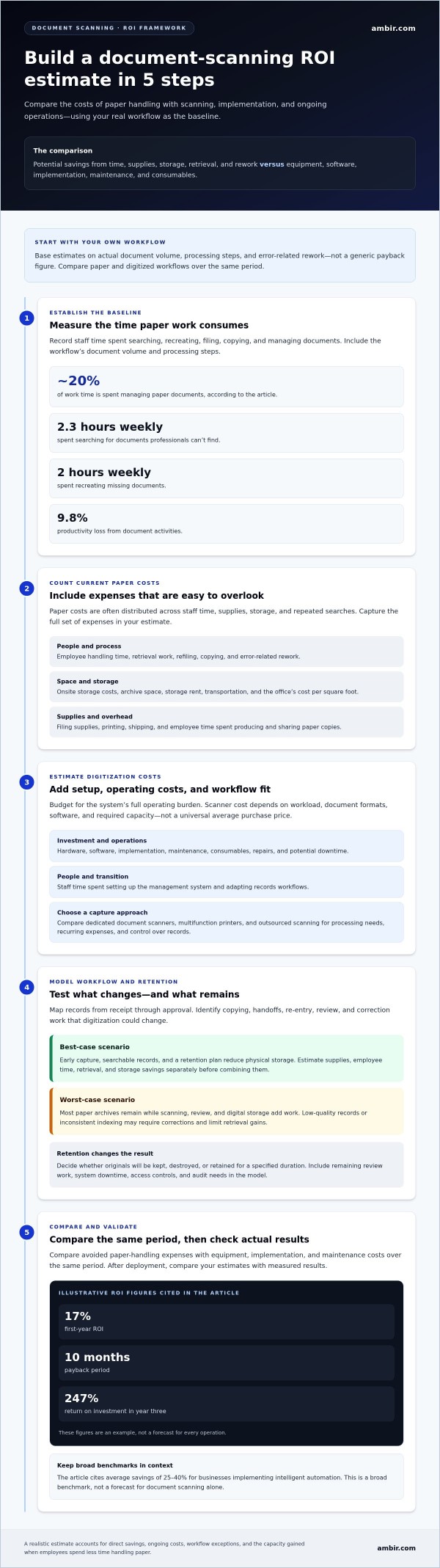
2.3 hours weekly spent searching for documents professionals can’t find
2 hours weekly spent recreating missing documents
9.8% productivity loss from document activities
Physical Storage and Space Savings
Physical storage savings come from reducing the space and labor needed to keep paper documents accessible. Archives require room, transportation, refiling, and retrieval, and records can be lost in storage. Compare monthly onsite storage costs with the space records occupy, using cost per square foot to estimate the value of reclaimed office area.
Scanning records earlier in their lifecycle can limit repeated handling. For example, employees can retrieve a digital project file without searching boxes or returning paper to a shelf. After scanning, organizations can keep originals, destroy them, or retain them for a specified duration.
Office Overhead Savings
Office overhead savings reflect the space and recurring expenses tied to paper-based work. Archives occupy areas that could support active projects, while filing supplies, printing, storage rent, and shipping add costs. Compare these expenses with monthly onsite storage costs and the office’s cost per square foot.
Reducing paper use can streamline operations. A team scanning incoming records can share digital files instead of printing copies for each department. Include supplies and employee time in the annual estimate, then assess the effect on overhead.
Employee Time Savings
Employee time savings create value when staff spend less time searching for, recreating, and managing documents. The infographic’s weekly figures show how repeated searches and missing records can consume work time. Digital access can reduce these steps when employees can locate and share the right information.
Use time freed from document tasks to support customer requests or active projects. Faster access can also improve responsiveness and decision-making, linking digitization to operational productivity.
Electronic document management investment expenses
Electronic document management ROI compares implementation and operating expenses with measurable workflow gains. Information workers spend about 20% of their work time managing paper documents, making baseline measurement essential.
Dedicated document scanners handle capture, while multifunction printers combine scanning with other office functions. Outsourced scanning moves capture work outside the organization. Compare each option’s fit for your processing needs, recurring expenses, and control over records. Scanner budgeting depends on workload, document formats, software, and required capacity, not a universal average purchase cost.
Scanner Investment and Running Costs
Investment expenses include hardware, software, maintenance, and consumables. Counting each category reveals the system’s total operating burden. Include equipment repairs and downtime, which the U.S. Environmental Protection Agency identifies as potential maintenance costs. Also account for implementation and staff time spent setting up the management system and adapting records workflows.
Enterprises should assess electronic document management ROI before purchase, then compare estimates with post-deployment results. It reports 17% first-year ROI, a 10-month payback period, and 247% return on investment in year three. Treat these figures as an example, not a forecast for every operation.
Automation, OCR, and Workflow Effects
OCR converts scanned text into machine-readable information, while workflow automation routes captured data through defined business steps. Their ROI depends on recognition accuracy and how much manual indexing, review, and correction they eliminate. Test representative records, including difficult layouts, then track exceptions and rework to determine whether automation improves processing efficiency.
Before records enter a management system, define retention, access controls, and audit needs. Digital document imaging can support searchable records and version tracking. Security risks include unauthorized access, disclosure, and retention errors. The European Union’s GDPR sets rules for protecting personally identifiable information. Access permissions and documented retention procedures help manage these risks.
Best-case and worst-case cost-reduction scenarios
A scanner can reduce labor by eliminating manual filing, copying, and retrieval steps. Digital records can also reduce reliance on physical archive space.
Storage and Handling Cost Reduction
Storage savings arise when digitized records reduce paper movement, filing, and retrieval. They matter because paper archives can add costs as records age. In a best-case model, scan records early, then choose whether to keep originals, destroy them, or retain them for a specified duration. Compare storage, transportation, refiling, and retrieval costs with the current process.
Operational Cost Reduction
Operational savings occur when digital access shortens routine handling and streamlines workflows. Map a paper record from receipt through approval, then identify each copy, handoff, and re-entry step digitization could remove. Include remaining review work and system downtime in the estimate. This helps separate actual labor reductions from tasks that simply move to another employee or department.
A best-case scenario assumes early capture, searchable records, and a retention plan that reduces physical storage. Estimate savings separately for supplies, employee time, retrieval, and storage, then combine them. Businesses implementing intelligent automation achieve average savings of 25-40%, a broad benchmark rather than a forecast for scanning alone.
A worst-case scenario keeps most paper archives while adding scanning, review, and digital storage tasks. Low-quality records or inconsistent indexing can require extra corrections, limiting retrieval gains. Model these exceptions alongside ongoing handling costs instead of assuming every paper step disappears after conversion.
Compare both outcomes using the same document volume and review period. For example, calculate one scenario where originals are destroyed after scanning and another where records remain in storage for a defined duration. Include regulatory retention needs in the second scenario. This comparison shows which process changes drive cost reduction and where digitization may streamline operations, without assuming every record can leave the archive.
Early ROI calculations help enterprises set cost-saving expectations and provide a benchmark for post-deployment analysis. Estimate office-space savings using cost per square foot and monthly onsite paper-storage costs.
Manual document processing costs
Manual processing expenses include staff time, rework, supplies, and the effort needed to manage paper records. Track each process to establish a baseline for comparing digital workflows.
Document Administration Costs
Document administration costs are the labor and correction expenses involved in handling records. They matter because filing, reviewing, and re-entering information consume employee capacity. A typical BPO processing 100,000 documents annually may spend 15-20 minutes manually processing each document, with error rates of 2-5% requiring rework.
U.S. Benefits packages add 20-30% to base salaries. Include these labor expenses, correction time, and software costs when comparing manual processes with a document management system. Business processes that rely on repeated data entry can also delay access to usable records.
Business document scanners process pages at different rates depending on the device, document condition, settings, and workflow. Compare throughput using the same page format and processing requirements, including any review or indexing after capture.
Paper-Related Costs
Paper-related costs include filing supplies, printing, offsite storage rent, and document shipping. These expenses accumulate alongside labor, even when each task seems routine. List them separately in the manual-process baseline, then compare them with the paper expenses that remain after digitization.
Outsourced scanning costs per page depend on project scope, document preparation, indexing, and quality review. Compare quotes using the same page counts, handling requirements, and output format.
For a clear comparison, record staff hours, rework, and paper-related expenses across the same review period. Then assess which processes software could enhance and which still require physical handling. Organizations can use that baseline to evaluate whether an upgraded digital workflow offsets its implementation and operating costs. Explore document scanner options as part of that assessment.
Ambir Technology: Document Scanner
Ambir Technology offers document scanners for organizations evaluating hardware digitization against manual processing costs. Match the scanner category to the records entering your workflow: a Document Scanner supports general paper records, while Insurance Card Scanners, ID Card Scanners, and Business Card Scanners serve specific document types.
Before selecting equipment, define document formats, capture volume, and the steps employees perform after scanning. These factors connect hardware investment to costs in your ROI analysis, including handling time and retrieval effort. Matching the scanner type to the records makes the comparison more useful.
Explore Ambir’s document scanner options as you evaluate capture needs. Visit Ambir.com or contact Ambir Technology to discuss your document scanning requirements.
Turn Your Estimate Into an Operational Plan
Use your ROI estimate to define what a successful digitization workflow must deliver. Select a document group with clear ownership, consistent handling steps, and a practical way to track results. Record the current process before changing it, then compare the new workflow using the same measures. This creates a useful decision point: expand digitization where it improves access and reduces manual effort, or refine the process where review and correction still consume time.
A document scanner ROI model becomes more valuable when it guides a controlled operational decision, not just a purchase discussion. Align stakeholders on retention, access, and responsibilities so the resulting digital records fit the organization’s work. Ambir Technology can help you explore hardware options for your document capture needs. Contact Ambir Technology to discuss your next step and move forward with a focused digitization plan.
Frequently Asked Questions
What does document scanner ROI mean and how is it calculated?
Document scanner ROI measures the financial return from digitizing records against the investment and operating costs. Calculate it as net savings divided by total investment, then multiply by 100 for a percentage. Net savings should account for avoided labor and paper expenses, less costs such as software, maintenance, and consumables. Use the same time period for savings and expenses to make the comparison meaningful.
What is the typical payback period for a document scanner investment?
Payback depends on document volume, current handling effort, and ongoing system costs. One ROI example for intelligent scanning reports a 10-month payback for a business process outsourcing operation processing 100,000 documents annually. Treat that as a specific scenario, not a typical result for every organization. Your estimate should reflect the work eliminated, any remaining review tasks, and the investment being evaluated.
How can a business calculate document scanner ROI using its own document volume and labor costs?
Start with the documents processed during a chosen period, then record the labor time for each task, such as sorting, data entry, and retrieval. Multiply hours by the relevant loaded labor cost, including benefits. Estimate the time and paper expenses that remain after scanning, then compare the difference with hardware, software, and maintenance costs. Track rework separately so errors do not distort the savings estimate.
About AMBIR
AMBIR is a manufacturer of digital capture solutions for businesses and consumers. Headquartered in Chicago, IL and founded over 25 years ago on the premise of creating the highest quality hardware backed by hands-on support. AMBIR provides a variety of document and card scanners, eSignature pads and barcode scanners for various industries including healthcare, financial services, legal and more. We are known for being a hands-on organization who supports its clients with an internal team of dedicated professionals who know their clients by name. AMBIR is considered a market leading solution in the healthcare space due to it’s wide selection of products that integrate with leading EMR/EHR systems.