


AmbirScan Web Connect
Add Document Scanning to Any Web Application.
One JavaScript SDK · One-Click Scanning · Zero Cloud Dependency · Windows & Mac
AmbirScan Web Connect bridges the gap between browser-based applications and local scanner hardware. A lightweight local app communicates with your scanner, using TWAIN on Windows and ICA (Apple Image Capture) on Mac, while exposing a secure local REST API. Your web application includes our JavaScript SDK and gains instant scanner access. Users click one button in their browser and the scanned document flows directly into your application.
1. Developer Adds SDK
Drop a single JavaScript file into your web app. Integration
guides for 10+ frameworks.
2. User Installs App
A lightweight app installs in minutes on Windows or Mac. Runs silently in the system tray or menu bar. Supports silent MSI and Mac MDM deployment.
3. Scan from Browser
Users click “Scan” in the web app and the document flows
directly in. No file saving, no uploading.
ARCHITECTURE AT A GLANCE
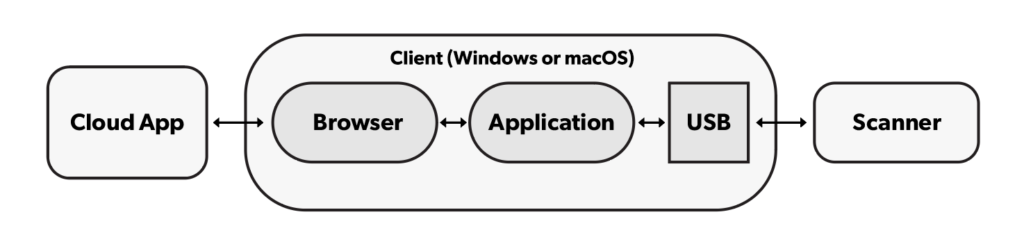
SECURITY: Your Data Never Leaves the Building
PRICING - Annual Subscription
All prices are per year, per workstation.
Free
-
Scanning Only
-
No Watermark
-
AMBIR Scanners Only
-
Windows & Mac
Barcode
-
Everything in Free
-
Driver's License & ID Parsing
-
16+ 1D & 2D Barcode Formats
-
Confidence Filtering
OCR
-
Everything in Free
-
Text Extraction (OCR)
-
Runs Client Side (No Per Page Cost)
Professional
-
Barcode & OCR
-
Saves $49 Versus Separate
-
AMBIR Scanners Only
Enterprise
-
All Features Included
-
3rd Party Scanners
-
Full TWAIN & ICA Support
INDUSTRY APPLICATIONS

Patient check-in with ID & insurance card capture, EHR/EMR portals, intake forms

KYC with instant driver’s license data capture, check scanning, loan docs

ID verification at service counters, permits, licenses, citizen documents



CORE CAPABILITIES
Driver’s License & ID Scanning
Scan a driver’s license or state ID and get the data back instantly. Web Connect reads the PDF417 barcode on North American IDs and returns parsed fields, including name, date of birth, address, license number, and expiration, ready to fill your form. No typing, no errors.
Works in Chrome and Edge on Windows and Mac, Safari on Mac, and any modern Chromium-based browser.
Reads 16+ 1D and 2D barcode formats, including PDF417, QR Code, Data Matrix, Aztec, Code 128, EAN, and UPC. Improved 2D processing reads driver’s license and ID barcodes faster. Adjustable confidence filtering.
Enterprise tier supports Canon, Fujitsu, Brother, HP, and any scanner with a TWAIN driver (Windows) or ICA driver (Mac). Lower tiers optimized for AMBIR scanners.
Windows: silent MSI installer, auto-start service, Group Policy-compatible certificate.
Mac: .pkg installer for Jamf, Intune, or any MDM, with auto-start at login and the certificate trusted in Keychain. No user interaction required.
DEVELOPER EXPERIENCE
WHY AMBIRSCAN WEB CONNECT?
SYSTEM REQUIREMENTS
Windows 10+ (64-bit) | Chrome, Edge | Scanner with a TWAIN driver | .NET 8 Runtime (included).
macOS 13 Ventura or later | Apple Silicon & Intel | Chrome, Edge, Safari | AMBIR sheetfed scanners (Enterprise: any scanner with an ICA driver)
Complete the form for more information
AmbirScan Web Connect on Github
Developers can access and download the AmbirScan Web Connect SDK on GitHub. AmbirScan Web Connect enables web applications to control local TWAIN scanners through a simple JavaScript SDK. It bridges the gap between browser-based applications and hardware scanners by providing a local Windows service that your web app communicates with via REST API. CLICK HERE to access AmbirScan on GitHub